just like that

  • Home
  • Make Money
    • Your Click
    • Others Click
    • Other Programs
  • Technical Support
    • Windows
    • Android
    • Other
      • how to do
  • online Is On
    • Online Media
      • Online Fm Radio
      • Online Tv
      • Online Games
    • Funny Videos
    • Downlaod Mp3 And MP4 Songs
    • Most Important Videos On Youtube
    • How To Make
  • Tourist Place
  • Health
    • Food Medicine
    • Workout
  • Image Collection

Saturday, 19 November 2011

Embed Chat in Your Blog: Interact with Site Visitors in Real Time

 22:29     No comments   


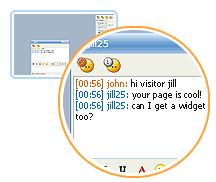
Blog Chat EmbeddedGabbly, Meebo Me and Stickam are three very popular IM services that let you embed live chat window plugins in your web pages or blog. So you can either chat with people while they are on your site or even the site visitors can chat among themselves.

Now since these blog chat addons are done in Macromedia Flash, visitors need not download or install anything in order to get started. As soon as they open your blog in any web browser, they are ready to converse with either you or other blog readers.

Why should I embed Live chat in my blog ?

Here are some reasons:

» It could be a great opportunity to get instant feedback about your blog from site visitors. A lot of your site fans may want to send you comments but they are sometimes too lazyto write you an email or even dropping a line in the comment section. But with these services, the visitor can start a conversation with you by simply typing in the text area - they can even choose to remain anonymous.

» A lot of service oriented and product websites have a "Talk to our representative" or "Live Support" button where visitors can speak with their support staff online without dialing any number or writing emails. If you also need to provide a similar customer support service on your blog or web page but don't have big budget, these IM services may be just right for you. Business online with zero setup cost.

» If you place Meebo Me in your site, it will show you the number of visitors who are currently visiting your site. The visitors will automatically appear as guest inside the meebo chat window even when they don't plan to chat. No web analytics program like Statcounter or sitemeter would ever be able to tell you how many people were on your site at 11:32 am.

I thought they would slow down my web page ?

Though all the three services download a swf file on the client computer, the footprint is very small and the visitors may not even notice any change in the site loading time. However, if you are still not comfortable with integrating chat windows in your main web pages, you can place them in a pop-up window which will only open when the visitor clicks on the hyperlink.

Gabbly vs Meebome vs Stickam - Which is better ?

It really depends on what you want to do with the service like do want to have control over the size of the widget, want group discussion, video chatting or just text chatting. Here's a quick review of the three services:

Meebo Me has a very pleasing interface and comes in three standard sizes so you can either fit it easily in the blog sidebar, main post or even in a popup. You will have to login into your meebo account so when someone visits your site, they will be able to instantly communicate with you through the meebome widget. [Thanks, Shahrzaad Parekh]

Stickam lets you do a live video chat with site visitors. The service is miles ahead of competition in terms of features and customization options. You can add your own skins, profile picture or even change the background color. Other than text chat, Stickam lets you share videos, photos, music within the player. Robin Good has a more detailedreview of Stickam when it was in the beta phase.

Gabbly lets you choose any custom height and width of the chat window so you can customize it as per your blog layout. Gabbly is for group chat so everyone who visits your page will then be able to chat with one another. The conversation can be subscribed to via rss feeds [gabbly chat for this blog]

  • Share This:  
  •  Facebook
  •  Twitter
  •  Google+
  •  Stumble
  •  Digg
Newer Post Older Post Home

0 comments:

Post a Comment

Video Game Godfather - Work From Home Selling Video Games Online

Click Here!

Appszero - Build Mobile Apps With Zero Coding

Click Here!

Translate

I Got Total Views

Popular Posts

  • 10 Different Url Shorteners That Give You Addon Benefits
    There was a point of time when no one ever considered the fact that there ever might arise a need for a URL shortener. In recent times, howe...
  • Create Short URLs with the Goo.gl Bookmarklet
    If you are looking for a way to create your own short URLs with goo.gl but without installing the Google Toolbar, here's a quick bookma...
  • how to avoid ads in youtube
    IT'S just simple right click select pop out thats all  
  • Live Flight Tracking on Google Maps
    Casper is a brilliant mashup that displays movement of incoming and outgoing flights on a Google Map  live . The airplanes are colored based...
  • Things You Should Do After Installing WordPress
    The WordPress tips and hacks mentioned below apply to a self-hosted installation of WordPress. You may skip if your WordPress blog is hosted...
  • Twitter Tip: Add a ‘Tweet This’ Link to your Blog on WordPress or Blogger
    Twitter can be a great source of traffic for your blog. To give you an example, my article on bookmarklets was on the delicious popular sect...
  • How to Set Up iCloud For Your iOS Devices
    Apple has introduced iCloud and Wi-Fi connectivity for Mac and other mobile devices . This is the most unique feature of  iOS 5 for iPad, iP...
  • earnparttimejobs
    earnparttimejobs:-                            Indians Earn Rs.50000/month via part time jobs. Easy form filling data entry jobs Earn Rs.25,0...
  • How 2G Works
    How 2G Technology Works Advancement in mobile phones technology has been marked by generation (G). Analog phones are related to the 1st gen...
  • Add Google Autocomplete to other Search Engines
    When you type a few characters in the search box of your favorite web browser - be it Firefox, Internet Explorer or the Omnibox of Google ...

Recent Posts

Categories

  • 12b
  • 180
  • 365 Kadhal Kadithangal
  • 3g
  • 4 Students
  • 7am arivu video songs
  • affiliate
  • Airtel Free Live Tv
  • Audio CD/DVD Burning
  • blog tricks
  • blogging
  • browser
  • Dish tv
  • download manger
  • download soft
  • earn sites
  • facebook
  • Favicon to Blogger
  • free call
  • free sms
  • games
  • Gemini Comedy
  • google
  • gprs
  • health
  • hindi
  • How do I create a blog
  • internet
  • iPhone
  • java
  • Kavithai
  • LG
  • live mobile tv
  • live tv
  • mobile
  • mobile tv
  • motorola
  • movies
  • mp3 player
  • Nadanthathu Enna
  • Noika
  • old movies
  • online fm
  • online movie
  • online movies
  • online tv
  • Photoshop
  • samsung
  • Serials
  • software
  • sony ericsson
  • sql
  • Surya Hits
  • tamil
  • tamil movies
  • tamil video songs
  • tamilmobiletv
  • tech
  • telugu
  • top 10
  • TV SHOWS‎
  • video converter
  • Video Players
  • video songs
  • windows software
  • youtube

Blog Archive

  • August (36)
  • September (39)
  • November (715)
  • December (627)

About Me

My photo
punniyaseelan
View my complete profile
Powered by Blogger.

Sample Text

Copyright © just like that | Powered by Blogger
Design by punniya seelan | Blogger Theme by New Blogger Themes | Distributed By Templates